
TV Boards · Game Day
Make game day
belong to
the venue.
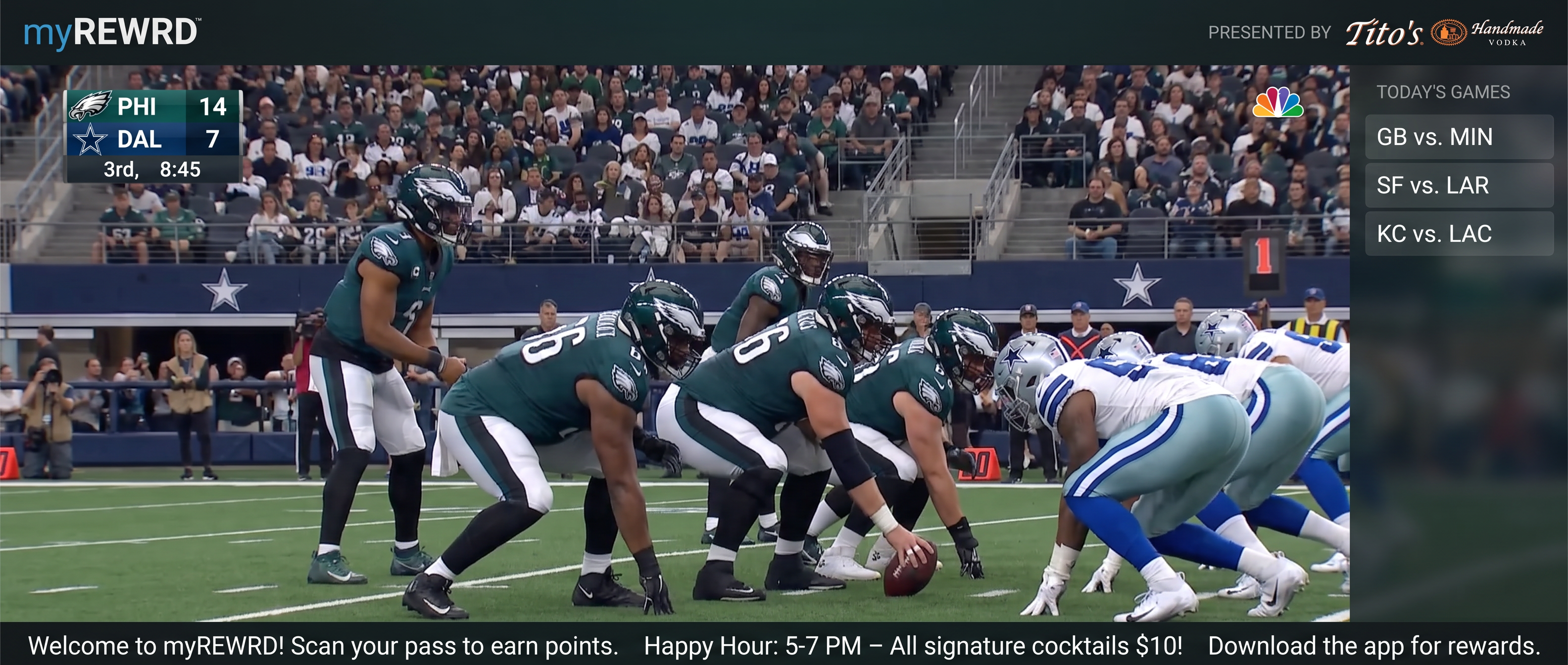
Show the game on your venue TVs and keep your approved sponsor message visible beneath the action.
Your team controls the screen
Choose the stream.
Set the sponsor.
Decide when it ends.
myREWRD controls the venue presentation—not the underlying sports rights or streaming subscription. The venue remains responsible for its source account and permissions.
One venue-managed screen
Lineup. Sponsor.
Game Day.
Switch between your lineup, sponsor messages, and live sports using the same TV Board.
Live stream + sponsor bar
Put the game on. Keep the venue in the frame.
Run the selected sports stream across the main screen while the sponsor bar holds approved partner text at the bottom of the display.
More ways to offer sponsorships
Give sponsors a place on game night.
Game Day creates a defined sponsor-bar placement while lineup and sponsor modes extend partner visibility across the venue-managed screen rotation. Your venue controls the approved message, placement, and campaign relationship.
- Approved logo or sponsor-bar text
- Venue-controlled activation and timing
- Game Day returns to the regular rotation when scheduled
- Commercial terms stay with the venue and sponsor
TV Boards · Game Day
Put the game and your sponsor on the same screen.
See how the live stream, sponsor bar, and regular venue rotation work together.
Want help setting up your venue TVs and sponsor messages?
Include it in a 30-Day Venue Launch