What did we bring in?
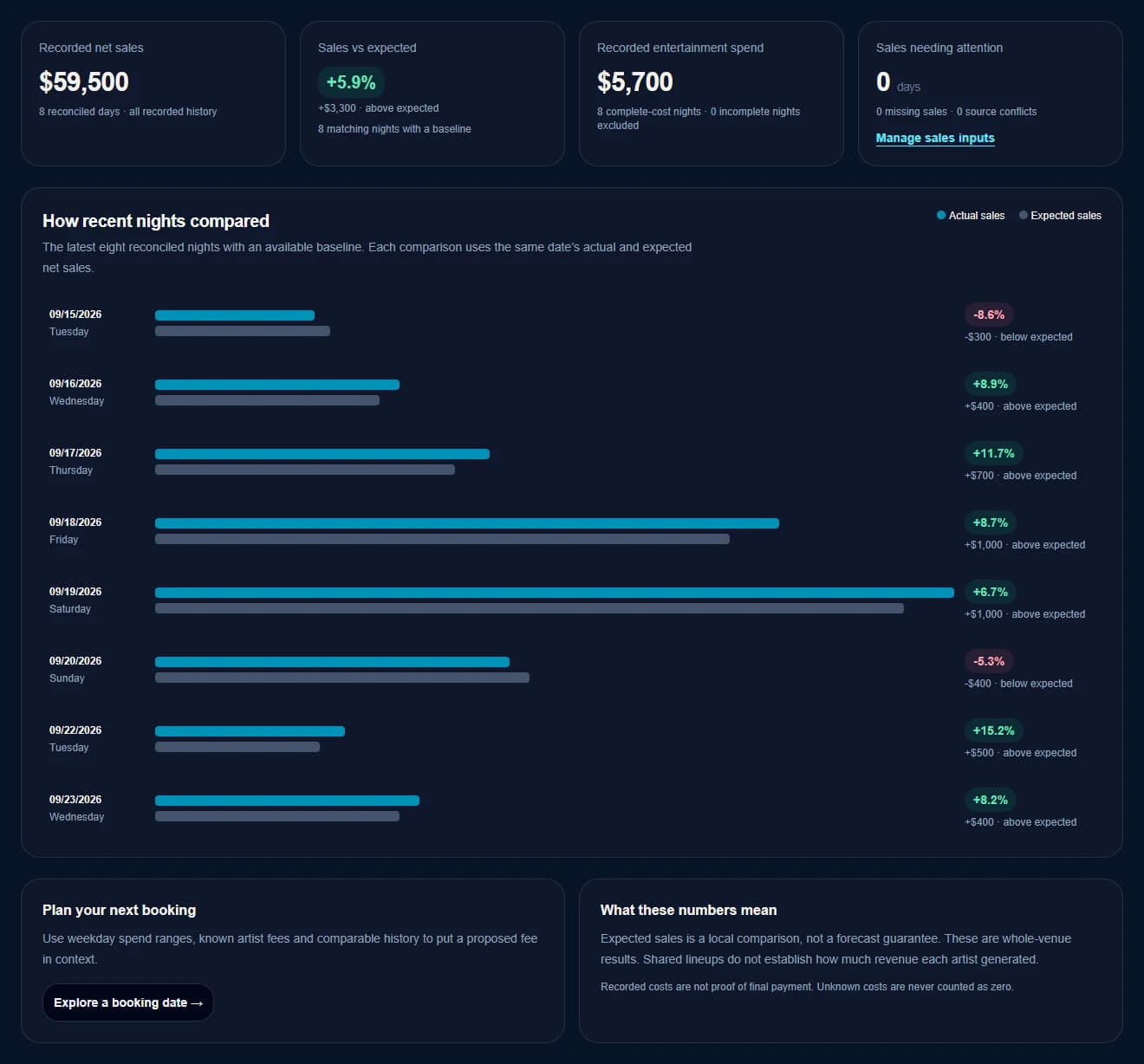
See the night’s net sales and how they compare with similar nights at your venue.
 The operating + revenue platform for live venues.
Booking Intelligence · Book. Sell. Run. Grow.
Put the night’s sales beside your entertainment costs.
Your staff close the night in the app. You and your booking manager use the history to decide who to bring back, which nights to fill and what to offer.
Run the whole venue. Learn from every night.
Before you fill the calendar
See what came in, what the entertainment cost and how the night compares with others you’ve run.
See the night’s net sales and how they compare with similar nights at your venue.
Put the night’s sales beside your recorded artist costs. Compare spending by day of the week and see where costs are still missing.
Look at past nights for an artist, a music style or a type of act. Compare weekdays and see how much history you have before making the call.
Check what you’ve recorded for that act before and what you’ve spent on similar weekdays. Give your booking manager a starting point for an offer you approve.
Sales are for the whole venue that night. Use them alongside your own read of the room and the rest of your running costs.
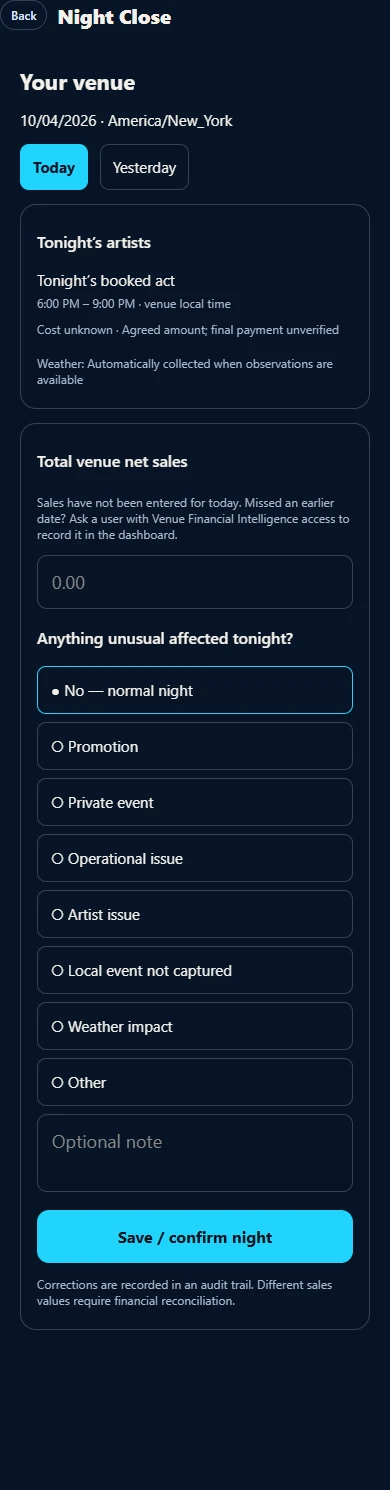
Night Close in your venue app
Check the acts. Confirm or enter the sales total. Add anything worth remembering. Save.
In the app, go to Profile → Night Close and choose today or yesterday. Review the acts and set times already listed for the night.
If sales have been imported, confirm the figure. Otherwise, type in the night’s total net sales. Your staff can close the night even without a POS import.
Mark the night as normal or flag something unusual, add an optional note, then tap Save / confirm night.
Give the right staff access to Night Close. Keep the full sales history with the people who manage the money.
From closing time to the next booking
One close. A clearer picture for you and your booking manager.
Your team serves the room and puts on the show. KUEVY already has the bookings for the night.
A staff member confirms or enters the sales total in the app and notes anything unusual.
Review sales beside entertainment costs and earlier nights at your venue.
Use what you’ve learned in Booking Manager and Talent Pipeline. Choose the act, date and offer, then follow your normal booking approvals.
Put the history to work
An act that works on Saturday may be a different decision for Wednesday.
Look back at an artist’s nights. Compare music styles, solo acts and full bands by day of the week. Check what you’ve recorded for entertainment costs before making the next offer.
When you plan ahead, KUEVY can use similar past nights to give you a sales estimate—when there is enough history to make that comparison.
Your experience still matters. Use the numbers to guide the conversation, then choose the night and the offer.
Use the full sales and entertainment history to decide which nights to fill, which acts to bring back and what you’re willing to offer.
Booking Manager and Talent Pipeline bring useful artist and fee history into the booking conversation. Your booking manager can use that history without access to your private daily sales or staff notes.
You approve the artist, date and offer. The artist still accepts, and your venue still gives final approval.
Start with the sales you have
Upload a supported daily-sales report from your POS in the dashboard and review it before saving. Prefer to enter it yourself? Night Close has a simple total net sales field.
Need to fill in older nights? The person with financial access can do that in the dashboard.
Show us how you close the nightSales estimates help you plan. They are not a promise of what a future night will bring in.
Run the whole venue.
See how your team can close a night in the app—and how you and your booking manager can use it to plan the next one.